You use AI all day now. You are still slower than you need to be, and you have probably stopped noticing why.
There's a famous xkcd comic, #1205, called "Is It Worth the Time?" It's a grid: how often you do a task across the top, how much time you'd save each time down the side. Every cell tells you how long you can spend automating that task before the automation costs more than it saves.
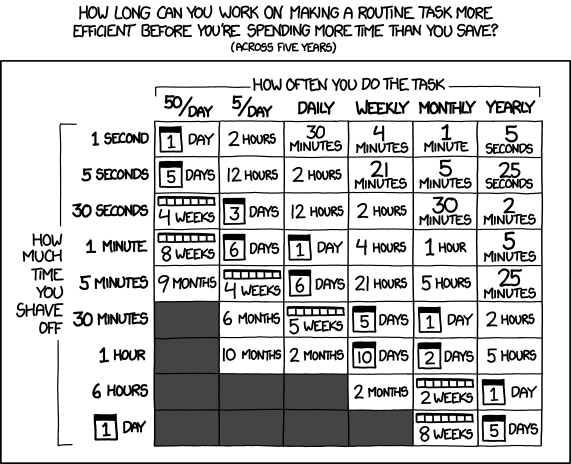
It's a great chart. It's also quietly obsolete.
It was published in 2013. Every number on it assumes the expensive part of optimizing is you: you sitting down to write the script, build the shortcut, wire the thing up. That assumption held for a decade. It doesn't anymore.
An AI agent now writes the script in about the time it takes you to describe it. The cost axis of that chart didn't shrink. It collapsed. Most of the "not worth it" cells just turned green.
The question is no longer whether to optimize. It's why you still aren't.
The honest answer, most of the time, is that you don't notice. You've done the slow version of a task so many times that it stopped feeling slow. It feels like work. You need a way to catch yourself in the act. That's what this post is: four levers, each with a tell, a symptom you can feel in the moment, so you recognize friction when you hit it and know exactly which lever to pull.
Speeding up a task is no longer the hard part. AI made that cheap. Noticing the task is slow is the hard part. This post gives you four levers and, for each, a tell: a symptom you can feel in the moment, so friction becomes something you catch and fix on the spot.
The Four Levers
Any task you do more than once is slow for one of four reasons. Each reason has a fix. Here's the whole framework on one screen:
| You catch yourself… | Lever | The fix |
|---|---|---|
| copy-pasting, switching windows, ferrying data by hand | Connect | wire the agent straight to the source (MCP) |
| doing the same sequence of steps again | Encode | a script or skill runs the sequence |
| typing the same instructions or knowledge again | Teach | a skill or config file carries the context |
| waiting, watching one task run while you sit idle | Parallelize | run work in parallel: subagents, worktrees |
The skill isn't memorizing this table. It's noticing the tell. The moment you feel "I've done this exact thing before," the lever is obvious. So before you read on, pick the one row that stung: the tell you read and thought "that's me." That's your weakest lever, and pulling it first buys the biggest jump. Now let's go through all four.
Lever 1: Connect (Stop Being the Data Bus)
The tell: you're copy-pasting. You alt-tab to a dashboard, copy a value, tab back, paste it. You paste a stack trace into the chat. You read a spec in one window and retype the relevant bits into another. Every one of those moves is you acting as a wire between two systems that could talk directly.
MCP, the Model Context Protocol, is how you replace that wire. An MCP server connects an agent straight to a tool or data source, so it fetches what it needs itself instead of waiting for you to ferry it over. You stop being the integration layer. MCP is the usual vehicle, but not the only one: any tool the agent can call directly, a CLI included, closes the same gap.
Where this shows up:
- Copying text, tables, or values out of a browser tab → the Playwright MCP server or the Playwright CLI, so the agent drives the browser and reads the page itself.
- Pasting a stack trace out of your error dashboard → the Sentry MCP server, so the agent pulls the whole issue, breadcrumbs and environment included.
- Ferrying issue and PR text between GitHub or Linear and your editor → the GitHub MCP server, so the agent reads and updates them directly.
- Looking up library docs in a browser and pasting snippets → Context7, so the agent fetches current docs inline instead of guessing from stale training data.
- Pasting query results out of a database client → a Postgres or Supabase MCP server, so the agent queries the database directly.
Those are five examples. You will hit far more. Moving data by hand feels like working, so this is the most invisible of the four tells: once you start watching for it, the copy-pasting and window-switching turns out to be everywhere.
The fix is a rule I keep: every copy-paste is a missing connection. When I catch one, I look for an MCP server for the thing on one end of it. Usually one exists. If you run none yet, start with the trio most developers install first: GitHub, Context7, and Playwright. When no server exists, you've found a gap worth a few minutes of building.
This applies to your own codebase too. A language server connects the agent to precise definitions and references instead of leaving it to grep blindly. I covered that in the post on LSP.
Lever 2: Encode (Script the Steps You Keep Repeating)
The tell: you're running the same sequence of steps. Not the same thought: the same mechanical procedure, the kind where you already know every step and you're just doing them. Cut a branch, start the server, open the file. Re-run the same three commands in the same order. If a junior could follow it from a checklist, it shouldn't be a checklist. It should be code.
Anything deterministic gets encoded once and run forever. It takes a few forms: a plain script or startup file for environment-level setup, a skill (a saved, named workflow an agent runs on command) for procedures the agent itself drives, and a hook for automation that fires on an event, like formatting every file the agent writes. I went deep on that last one in the post on hooks.
Where this shows up:
- A startup script that opens a split terminal, Claude Code in one pane and Codex in the other, so my dual-agent setup is one command instead of five.
- Cutting a git worktree and serving the site on localhost to iterate on it. I ran exactly that to write this post: two commands, encoded, zero thought.
- Project bootstrap: scaffold, install dependencies, and write the base config in one go.
- A release flow: run tests, bump the version, update the changelog, commit, open the PR.
The fix: the second time you type a sequence is the signal. Not the fifth, not the tenth. The second. The cost of encoding it is now low enough that "I'll do it by hand a few more times" is the expensive choice.
Lever 3: Teach (Save the Context You Keep Re-Explaining)
The tell: you're typing the same instructions again. Not steps. Knowledge. The standards, the preferences, the background an agent needs to do the thing your way. Every time you start a LinkedIn post you paste the same paragraph about tone, length, and what to avoid. Every new session you re-explain your stack and your conventions.
Teaching means moving that context somewhere persistent, out of your head and your fingertips. A CLAUDE.md for project conventions. A skill that carries the instructions for a recurring kind of work. A memory file for facts about you that never change.
Where this shows up:
- LinkedIn posts: every time, I pasted the same instructions: hook style, length, no emoji, where the call-to-action goes. Now it's a skill. I describe the topic; the rules come for free.
- "Review this PR the way I review": your review checklist, written down once as a skill.
- Project conventions (naming, test layout, commit format) living in
CLAUDE.mdinstead of in a correction you make every session. - Your own writing voice, so a draft comes back sounding like you wrote it.
The fix: if you've explained the same thing twice, write it down where the agent will read it. The third time should cost nothing.
These two overlap, and that's fine. A skill often does both at once: it carries instructions (Teach) and runs steps (Encode). The line that matters: if the work is purely deterministic and lives outside the agent's reach (your terminal layout, your environment, your machine), it needs a real script, not just a skill. Don't try to Teach something that should be Encoded.
Lever 4: Parallelize (Stop Waiting)
This is the big one. The first three levers each make a single task cheaper, and each is something you build once and reuse. Parallelize is different. There is nothing to install. It is a default to change in how you work, and it is the one that pays the most.
The tell: you're waiting. The agent is running and you're watching output scroll by. Or you have three independent tasks and you're doing them one after another, because that's how hands work: one thing at a time. That idle time is the tell, and it's the easiest one to stop noticing, because waiting feels like part of the job.
Look closer at what's actually idle. It isn't your hands. It's your brain. While an agent thinks and generates, your attention is parked, waiting for tokens to land. With a single agent, half your working rhythm is dead air: think, dispatch, wait. In the AI era your hands stopped being the bottleneck. Your attention is, and one agent can't keep it full.
And watching the output stream feels productive. It feels like supervising. It isn't. The response is exactly as correct whether you watched it arrive or not.
Watching the agent work is a progress bar you chose to stare at: the most comfortable way to burn the time this lever exists to reclaim.
So fill the idle time. You're no longer the one doing the work, so you're no longer limited to one piece of work at a time. Run several agents at once. Subagents fan a big task into slices. Separate git worktrees let two features get built in parallel without colliding. The split terminal, Claude on one side and Codex on the other, is parallelism: two agents on one problem, or two agents on two. While one generates, your attention is on another's output. The brain never parks.
Where this shows up:
- Subagents: hand a research sweep to three agents at once, each taking a slice, and read three conclusions instead of running three searches yourself.
- Worktrees: two branches, two agents, two features, no merge collisions.
- Split terminal: Claude implementing while Codex reviews or stress-tests the same code.
- Background tasks: a long build or test run goes to the background and notifies you when it's done. You don't sit and watch it.
Why it's the multiplier: Connect, Encode, and Teach each shave time off a task. Parallelize removes the constraint that you can only run one task at all. A 20-minute job, run ten at once, still costs 20 minutes. That's not a 10x on one task, it's a 10x on your day. On a normal day I run 20 to 30 sessions in parallel, and the ceiling was never the agents. It's how many streams of output my attention can review. And it compounds with the other three: tasks that are cheap to start, because you Encoded and Taught them, are exactly the tasks worth running twenty of.
The mindset shift is the real deliverable here. Stop asking "what's the next step?" Start asking "what could be running right now that isn't?" Your job moves from doing the work to dispatching it and reviewing what comes back. The target is a brain that's never idle, always reviewing one agent's output while the next two run.
The Habit: Keep a Friction Log
A framework you nod at and forget is worth nothing. Here's the practice that makes this stick.
For one week, keep a friction log. One line, written the moment you feel it: "copied the error into chat again," "re-typed the deploy steps," "sat watching a 4-minute build." Don't fix anything yet. Just catch the tells.
At the end of the week you'll have a ranked list of your own slowness, in your own words. Every line maps to a lever: copy-paste to Connect, repeated steps to Encode, repeated instructions to Teach, idle waiting to Parallelize. Pull the levers, worst offender first. Most fixes take minutes, because the expensive part, building the fix, stopped being expensive.
Then it compounds. xkcd's chart amortized a single optimization across five years. It never imagined you'd fix ten things in one afternoon.
The 2013 question was "is it worth the time?" and the honest answer was usually no: optimizing cost more than it saved. The AI era flipped that answer to almost always yes, which quietly retires the question itself.
The only skill left is noticing: catching yourself in the slow version of a task before it disappears into "this is just how the work feels." Connect, Encode, Teach, Parallelize. Four levers, four tells. Learn the tells.